How To Remove Your Web History From Google Servers?

Google stores all your search history. If you are worried that your search and other stats about images, news or videos that you have been looking at Google are stored at their servers then there is a simple way from Google itself to remove them.
Google stores all the searches that you have made till date so that it can serve you better. Even the results that you click on from the searches are stored so that Google may know the likings of the users. Google uses this information to decide the ads that it displays under sponsors listing and also to suggest you the relevant words. However most of us do not like Google storing our personal data. People think that Google knows much about us than needed. Our likings, our behaviour, our mails, our online life is all in hands of Google. Nevertheless, the search giant itself provides measures to delete all your search history. To remove all your searches till date follow these steps:
1) Go to http://www.google.com/history/
2) Click on Remove all web history present at top center of the page.
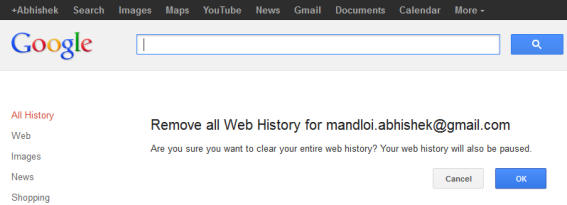
3) Confirm the deletion by clicking on Clear History button.
Good News is that Google will also stop recording your searches from now on. If you want Google to record your searches then you can simply start it again by clicking on Resume link.
Related: Delete Google search History from browser, toolbar and desktop search.







Would this remove the history from server and would it become impossible or at least really tough to get the browsing history back? Please give me certain and accurate answers,I need to know. Thank You.
Google won’t record your searches but it does not mean that they will delete your previous history. There is no way you can delete all your data with Google.
it is only history for signed in accounts. what about the IP adress? THAT is what I want to clear as we are a bussiness and we get lots ads based on the IP adress histrory and we want it to be cleared. so how do we clear all search data for a specific IP adress?????
That just deletes the history saved on your google account. Google still has your history.