Search Inside Websites With Chrome Address Bar (Omnibox) and Save Your Time

Everyone knows that Google Chrome Address bar AKA omnibox can also be used as search box. That is type your query term and simply hit enter to search in Google. A new feature will let you search inside websites by hitting tab button.
This functionality gives quick search inside websites that you have previously visited. This is same as site: operator which restrict search the pages of a specific site. [View list of search query options]. It is a useful feature if you already knew where to find right results or you have already visited it but forgot its location. For example, a YouTube video or Facebook profile.
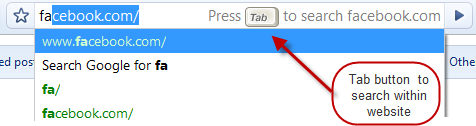


To use this handy feature, all you need to do is to start typing name of website in omnibox. After few letters, website name would automatically come up and then you need to press tab button to search inside that website. Now you can search inside that website for anything.This functionality doesn’t work for all websites as of now like Microsoft but expected to fix this soon in near future.
This shortcut will save time for searching without actually going to that site first.







This is a crappy workaround, and doesn’t work for 99% of sites. It’s ridiculous that the Google toolbar doesn’t work with Chrome.
doesn’t work.with vancouver2010.com/
Doug, unfortunately this only works with popular websites like youtube, facebook and others.