Here’s How To Strikethrough Text in Gmail

Strikethrough may not be the most commonly used formatting option, but it’s very important when needed. Usually used to mention the originally intended text while writing the alternate text. Although it’s a rather basic feature of most text editors, for a very long time Gmail had not supported the strikethrough formatting option. We had to depend on strikethrough text generators or editing the HTML code to get this feature in Gmail.
Thankfully, at the start of 2019 Gmail has finally started supporting a strikethrough button natively. However, it is available in a rather obscure place so you may not be able to find it immediately. Therefore, today I’ll show you how to strikethrough text in Gmail natively.
Strikethrough text in Gmail
The strikethrough option is available in the native text editor of Gmail, and there is no need to enable it prior. Below you’ll find the step-by-step instructions to use it:
Open the Gmail “Compose” window and type in the text you would like to strikethrough.
Now select the text by holding the left-click and dragging, and click on the “Formatting options” button at the bottom.

Here click on the “More formatting options” button at the right end of the bar and select “Strikethrough” from it.
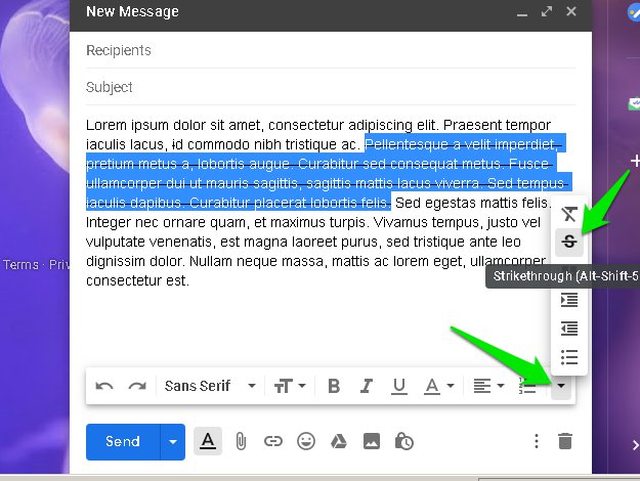
That’s it, you have successfully strikethrough text in Gmail.
Strikethrough text in Gmail using a keyboard shortcut
The above instructions are sufficient to strikethrough text in Gmail. However, it isn’t very convenient when you need to click three different options just to strikethrough. Fortunately, Gmail also introduced a keyboard shortcut to quickly strikethrough text in Gmail.
Windows users can press “Alt+Shift+5” keys to strikethrough selected text. And Mac OS X users can press “Cmd+Shift+X” keys to strikethrough text.
You can repeat both the above methods again to remove strikethrough from the text.
Ending words
Google introducing the strikethrough button natively in Gmail has really made email composing easier on the desktop. Unfortunately, this option still isn’t available on Gmail Android and iOS apps. You’ll have to depend on a third-party editor if you need to strikethrough text on your smartphone. If you have any questions, feel free to ask in the comments below.







but actually,
why to strike through text????
Sometimes we need to cut few words but also at the same time we want to show them in order to be politically correct.
So basically, this isn’t a Gmail trick..you’re just copy and pasting.. which you can do with almost anything that isn’t necessarily accessible within the gmail editor. A trick would be how to do it inside the actual Gmail editor without using other editors like MS Word.
I am sorry to say Deena that wont be possible. Yeah, we are just coping and pasting it, but not many people figure this out.
does the same work for pages?
Yes, it does :)
What a waste of web space! Copy and Paste!!
This seems to be the only workaround until Google comes up with new functionality.
Thanks but this does not work when copying from word to gmail when on a mobile….any ideas?
Cheers!
Try with Gmail mobile site, not with it’s app.
thanks for sharing this
STRIKETHROUGH suggestions made in this article don’t work at all. Copying and pasting doesn’t work, the strikethrough option is not offered when I right-click on the ellipse at the right, and “Alt+Shift+5” doesn’t work at all either. This comment written in May, 2022, three years after this article written. I run a high-end business-class HP notebook, updated and scanned constantly; it’s not my machine.
Maybe G-Evil has changed Gmail’s code or formatting. I don’t know that, but I know that this article needs an update.
You should also correct a confusing error: You wrote about the, ““More formatting options” button at the right end of the bar”, but it’s at the LEFT end.