How To Change Typing Language in Google Docs

If you need to create documents in multiple languages or any other language than the default one, then it’s possible to change the language in Google Docs. Google Docs lets you change typing language on the go and even write a document in multiple languages.
Google Docs also offers multiple input tools for non-Latin languages to make it easier to type in other languages like Russian, Arabic, Hindi, etc. Let’s see how you can change the language in Google Docs.
Change language in Google Docs
Whether it’s a new document or an already written one, you can change language any time and the change won’t affect the already written content. Here’s how to do it:
Click on the “File” menu and hover your mouse cursor over the “Language” option.
A list of languages will show up and you can choose your desired language here.

If you have selected a non-Latin script, then you will have to select an input tool to use it.
On the right end of the top bar a new option of “Input tools” will appear. Click on the drop-down menu next to it to select the input tool.
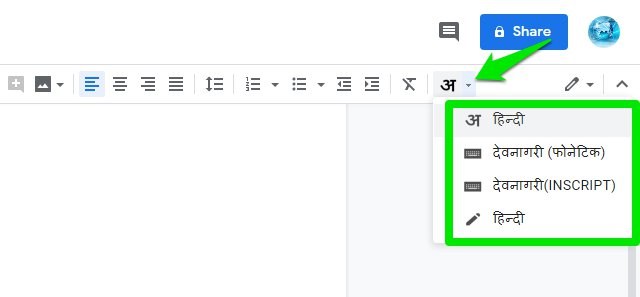
The input tools vary from language to language. For example, for Hindi, you can type in Latin and convert it to Hindi, use a virtual English keyboard, a virtual Hindi keyboard, or even draw it.
Ending thoughts
I should also mention that changing language will also change the spell checker to that specific language. Overall, it’s quite easy to change the language in Google Docs, but it can be a little tricky to notice the input tools that actually let you type in the new language. Do let us know in the comments if you have any questions.








Thank you for providing this information. Thanks a lot.
For some bizarre reason, language input is UK English under the File … menu, as it should, but the input tools are all about Greek (I am Greek, so a few things around the computer are in Greek, but that didn’t affect googledocs till now). When I toggle the language on the Windows keyboard layout, not in the browser, instead of straighforwardly inserting the latin characters, as in this box, googledocs brings up a box with numerous rubbish options about how to transliterate go Greek. How can I have ordinary in put??