Sort and Search Gmail by Size
Despite having highest free storage, sometimes you start running out of space in Gmail. This is due to those large attachment mails which you can never find. They are difficult to find as Gmail does not sorts by size but you can find them by searching by size.
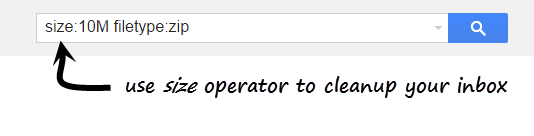
To Search Gmail by Size, Use size: search operator
Search format is
size:[size in bytes]
The search operator searches in bytes by default. You can also use M to search in megabytes.
| Mails with attachment size 5MB or more | size:5M | ||
| Mails with attachment size 10MB or more | size:10M | ||
| Mails with attachment size 20MB or more | size:20M |
You can also use multiple search operators together for conveniently finding large mails with special properties. For example: You can also use filename operator to search by file type. For example – filename:(mpg OR mpeg OR avi OR wmv OR mov) searches for mails with videos in attachments. Similarly you can use filename:zip OR rar or MP3 to quickly find space hogging mails.
Google’s free space is shared between all Google products – Gmail, Drive, Photos etc. Transferring attachments from Gmail to Drive will not have have any effect on total storage.
Related: Sort Mails by Subject, Label and Sender







wish to delete 7-8000 sent emails, without distinction (not by size, attachments, etc) simply by date(s)… starting from the oldest and working forward; everything in that period.
have 10,000 at the moment and need only the last couple of thousand – if that.
just let me know how … from c. 2019 working toward the present.
currently deleting them one-at-a-time !!!
Maybe this article will help you. Let me know if it doesn’t work:
https://www.gtricks.com/gmail/how-to-bulk-delete-gmail-emails-3-easy-ways/