AdBlock Plus Trick in Google Chrome – Block Advertisements without Addon
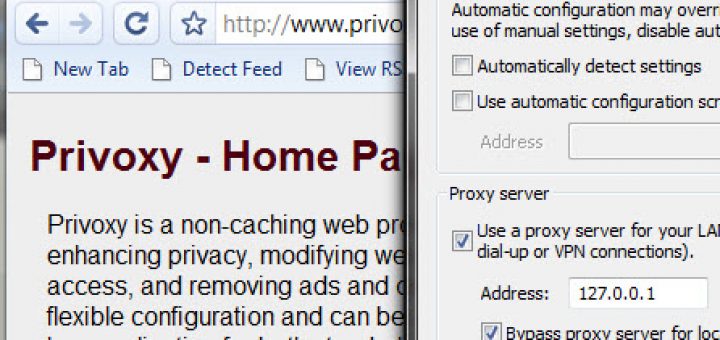
If advertisements keep you bothering in Google chrome and wished that you could block these ads as you do in Firefox by Adblock plus addon, then you can use a simple trick with chrome to remove these ads.
Adblock Plus is one of the most popular and downloaded Add-on for Firefox. For those who do not know, this addon blocks all the annoying advertisements from the web page saving you considerable bandwidth and time. Google chrome still does not have any extension support but folks from Geekzone forum founded a workaround to block these ads.
Blocking ads give you certain advantages like keeping you focused on main content and it saves your time by not downloading the entire content of webpage. In addition, the webpage looks much cleaner with clutter-free ads. Here is how can block advertisements without any addon :

1) Install any web proxy software. I founded Privoxy straight-forward and simple to use. [Download]
2) Click on the Wrench icon, which is present at the upper right corner of Google Chrome.
3) Now choose Options > Under the hood > Change Proxy settings.
4) Under the “Connections” tab of Internet Properties, click on LAN settings button.
5) In the Proxy Server section, check the “Use proxy server” option and put 127.0.0.1 in the address field and 8118 in the port field.
6) Also select “Bypass proxy for local settings“.
7) Click OK, and restart Chrome. You are done.
[Source]
You can also use BFilter instead of Privoxy, which is open source and seems to work smoothly then later. You can also browse Google directory for free proxy software here. There is also an Adsweep user script, which blocks ads from Chrome, Opera and Firefox though its developer does not support it now .
Note: If you like to stop malicious websites, cookies, malwares, 3rd party software’s and bugs through your internet connection then it is recommended to use host files or pretty simple OpenDNS (suggested). Both of them are platform independent, which means that they will work for Google Chrome, Apple Safari, Opera, Firefox and internet Explorer.









Adblock Plus is now officially available for the Google Chrome browser as well. Just visit the website https://adblockplus.org/en/chrome, it is much better than all previous solutions.