Remove Dash — Appearing Before Gmail Signature

Gmail by default adds dashes “- -” line before the signature. Also, the signature text color becomes grey automatically. You can avoid this problem with the help of little known Gmail lab feature – Signature Tweaks.
To remove dash, follow these steps –
1) Go to Labs from Gmail Settings.
2) Start searching for ‘Signature Tweaks’ on the lab page.
3) Enable the feature from the radio box.
4) Click on ‘Save Changes’ at the bottom of the page.
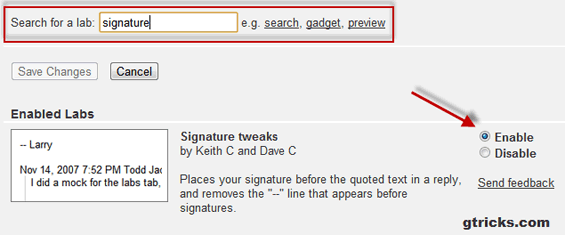
Now, there will be no dash or greyish text in your signature. Along with this advantage, your signatures will appear just below the bottom of your replied mail and after complete mail.
On a personal note, I recommend to use Wisestamp for making any signature related changes. It’s free and you can use colored text, images and links in your signature.
Related: How to insert image in Gmail signature.







Very helpful, thank you!
Thanks Abhishek. Exactly what I was lookin for!
https browsing was disabled? o.o’
Thanks!!
This only works with text signatures. If you use an image you get hyphens no matter what.
Easily remove dashes from sig
Go to general tab and beneath the box containing your signature, it says:-
Insert this signature before quoted text in replies and remove the “–” line that precedes it.
Just place a check mark in it.
Easy peasy lemon squeezy.
Hiya. Do you know if there’s any way to remove the “–” but also not have the signature by default in replies? I’d like to have a signature for new emails (with no “–“) and no signature or dashes or anything on replies and I can’t figure out how to do it!
Thanks for the great tip, as well as for the WiseStamp recommendation!
We love seeing how our users makes the most of their email signatures.
Simcha@WiseStamp
Simcha, glad I could help. Looking forward to hearing much more from you :)
Thanx alot, I didn’t check the small case to enable/disablethat — . Thank you